
The register is honest work. A ruled notebook, a pen, and years of hisab written in your own hand. It has never crashed, never needed charging, and every farmer knows the sight of it. So why change anything?
Because the register leaks in small, quiet ways. An entry gets skipped when three cans arrive at once. A column of litres gets added up wrong at 5 a.m. Then, at month-end, a farmer says his total is short by ₹200, you both flip through smudged pages, and neither of you can prove who is right. None of this is a disaster on any single day. But over a month it adds up — to lost money, lost time, and the odd bit of lost trust. The good news is that fixing it does not take a month. It takes an afternoon.
Before you start
You do not need much. Gather three things and you are ready:
- An Android phone — the one already in your pocket is fine. Install the free Milk Sarthi app from Google Play.
- Your list of regular parties — the farmers you buy from and the customers you sell to. A quick glance at your register gives you the names.
- Your current rate — either a single flat rate (say ₹42 per litre) or a Fat/SNF chart if you pay on quality.
That is the whole toolkit. No computer, no training, no help from anyone. Set aside an unhurried hour between shifts and let's go.
Step 1 — Add your parties
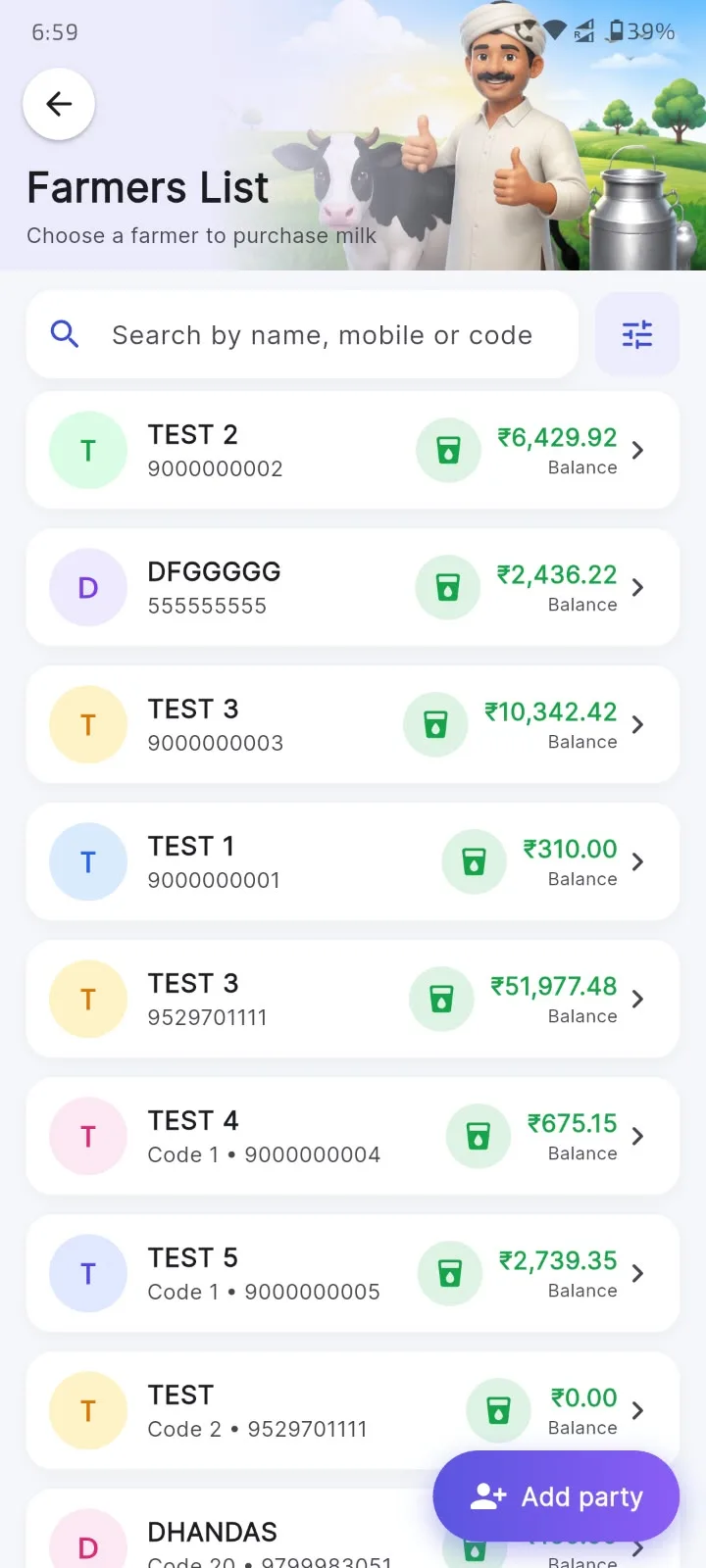
Open the app and start adding your people. For each one you enter a name, a mobile number, and the village. Do the farmers you buy milk from first, then the customers you sell to. If you have thirty regulars, this is maybe fifteen minutes of typing — the sort of job you can knock out while the milk is settling.
Don't try to be exhaustive. Add the parties who come every day; you can add the occasional walk-in later, right when they show up. The point is to get your core list in so each person has their own khata from day one.
Step 2 — Set your rate
Next, tell the app how you price milk. If you pay everyone the same flat rate, just type in that one number and you are done in ten seconds.
If you pay on quality, you'll set up a Fat/SNF rate chart — the grid that turns each Fat and SNF reading into a price per litre. Typing a full chart by hand is the one tedious bit of the whole switch, so don't. If you already have a printed chart, an Excel sheet, or even a photo of the union's chart taped to your wall, the app's AI can read it and fill it automatically — the entire grid, in a couple of minutes. Set the rate once and you never touch it again unless prices change.
Step 3 — Record one shift
Now the real test. At your very next morning collection, do it exactly as you always do — but in the app instead of the notebook. As each farmer's can comes in, tap their name and enter the litres. If you pay on quality, punch in the Fat and SNF too. The moment you do, the app looks up the rate for that milk and shows the amount, so there's no mental arithmetic and no scribbled sums in the margin.
Do the whole shift this way. It will feel a touch slower on the first day — everything new does — but by the second or third can your thumb already knows where to go.
Step 4 — Cross-check with your register
This is the step that builds trust, and it's worth not skipping. For that first shift, record it in both places — the app and the register — and then compare the two totals at the end. Same litres? Same amount for each party? Same grand total for the morning?
When the numbers line up (they will), something quietly shifts in your head: the app is not a gamble, it is just faster paper that also does the maths for you. Do this once and you'll stop double-writing on your own, because you'll trust the number on the screen.
Step 5 — Share the first bill / print a slip
Here's where a farmer feels the change. At the end of the shift, hand each person a printed receipt from a 52mm slip printer that pairs with your phone over Bluetooth — litres, Fat, SNF, rate and amount, right there in their hand. No memory, no "I'll tell you later." And when the cycle closes, you share each party's statement as a clean PDF straight to WhatsApp.
Once your farmers are holding printed slips and getting tidy PDFs on their phones, the register has done its job. You can retire it — put it on the shelf, not in the bin — and run everything from the app.
What about my old data?
This is the worry that stops most owners, and it's a myth. You do not re-enter months of history. Nobody expects you to copy a year of a paper register into a phone. You simply pick a start date — the first day of your next billing cycle is perfect — and record from there.
Any pending balance from the running cycle just carries in as an opening amount in that party's khata, so no udhaar and no advance gets lost. The old register stays as your reference for the current cycle. Once that cycle is settled, you'll almost never open it again — but it's there if you ever want to look back.
See the full picture of what the app handles — collection, sales, the khatabook, rate charts, printing and reports — on the features page.
Key takeaways
- The register works, but it leaks — missed entries, wrong sums and month-end disputes cost you quietly.
- You need only three things: an Android phone, your list of regular parties, and your current rate.
- Add parties, set your rate (let AI fill a Fat/SNF chart), then record one shift in the app.
- Cross-check that first shift against the register once — matching totals build trust fast.
- Print a slip and share the PDF bill; then retire the register but keep it on the shelf.
- No history to re-type — start from today and carry pending balances in as opening amounts.
By the time you close your first bill on the app, the switch is already done. Not over weeks, not with a helper looking over your shoulder — just one ordinary day, ending with a farmer holding a printed slip and nodding at a number he can see for himself.